This is default featured slide 1 title

Go to Blogger edit html and find these sentences.Now replace these sentences with your own descriptions.

This is default featured slide 2 title

Go to Blogger edit html and find these sentences.Now replace these sentences with your own descriptions.

This is default featured slide 3 title

Go to Blogger edit html and find these sentences.Now replace these sentences with your own descriptions.

This is default featured slide 4 title

Go to Blogger edit html and find these sentences.Now replace these sentences with your own descriptions.

This is default featured slide 5 title

Go to Blogger edit html and find these sentences.Now replace these sentences with your own descriptions.

Saturday, October 6, 2012

How to enable right click in web-site?

Why Right Click is Disable?

Right clicking your mouse can be very useful when surfing the web. It allows you to save images on webpages to your hard disk, to view source of a particular webpage, to download background music from a blog (when website code isn't complicated), and much more.
Now days, many websites and blogs doesn't allow you to right click on thier websites. I studied HTML and basic web designing, so I like to look at webpages' HTML codes when I find a new interesting website. And it makes me angry to find out that I can't right click. But as you know, there is always a way to get around something.
Just follow this Step.


Go to your browser`s options & disable java script. And reload your site. Now you can right click in website and blog.

Friday, October 5, 2012

How to Sniff HTTP POST Password via Network Using Wireshark Network Analyzer?


    How to Sniff HTTP POST Password via Network Using Wireshark Network Analyzer?

    Nowadays most website around the world more than 50% of them (in my opinion ) they didn't provide a secure access into a personal profile or some page that require authentication process where users input their username and password. As we know that data sent via port 80 (HTTP) was plain and without any encryption.
    This tutorial can be an angel and also devil in the same time, it depends to you who use this tutorial for which purpose…me as a writer of this tutorial just hope that all of you can be an angel and know the bad things can happen from it, because I believe that no one from you want your password sniffed by someone out there so don't do that to others too .
    Requirements :
    1.Wireshark Network Analyzer (wireshark.org)
    2. Network Card (Wi-Fi Card, LAN Card, etc) fyi : for wi-fi it should support promiscious mode .


    1. Before we go to step by step section, here's the scenario : v4L is an attacker and he was sitting and drink starbucks coffee with laptop on his table and he's connected to free wi-fi service there. He run Wireshark for a couple moment and he analyze the data sent across the network and he try to find the password that inputted by victim.
      Step by Step :

      1. Download your wireshark and install it (in Windows you just need to click NEXT and FINISH to install it), in Backtrack 5 it's already there. Run the program (Windows : double click the icon; Backtrack : open terminal and type wireshark).
      from the picture above maybe your network card is different, just choose which one is your network card and click start..


      wireshark

      2. Victim with the same network with v4L was really love to open this two website.
      wireshark


      3. After victim open that two websites, wireshark on attacker computer catch some data cross the network.
      wireshark

      4. After some times then attacker stop capturing the packet on the network by click the button (see picture) to stop Wireshark Network Analyzer from capturing the packet.
      wireshark

      5. If you learn about web programming, you should know that data from FORM can be sent with two method POST or GET (for details about this POST and GET definitions you can google for it).
      The attacker know that authentication process should be use POST method for data transmission, then v4L use the filter feature in Wireshark to just only filter the HTTP POST method.

    wireshark
                                     http:.request.method == "POST"
                                     
        
          then press ENTER or click Apply.

      1. If you only see the filter result, maybe you can be a little confused with the data contents over there. We can expand the data, but it's too many information that can make us hard to read one by one the data over there. For the simple thing we can use the ”Follow TCP Stream“ feature. Choose the data, right click and choose Follow TCP Stream.

    wireshark
                            
    Here's the result after we make it more readable by human.

    wireshark
    1.  oops the username and password was visible there. .

      How to remove watermark from image online?

      step 1
      Open an Internet browser window and navigate to "http://www.pixlr.com/editor/." This is a free
      online image editor. You can upload images from your computer, create new images or specify
      the URL of the image you wish to edit. Choose either to "Open an Image from your Computer
      or "Open Image from URL." Browse to your desired image or type in the URL of the image's location.

      step 2
      Select the Clone Stamp Tool from the toolbox at the left of the screen. The tool looks like a
      small stamp with an arrow in it and is located beside a pencil. You can also press "S" to select the
      tool.

      step 3
      Select an area of the image that is comparable to any portion of the watermark you need to
      remove. For instance, if part of the watermark is on a dark green area of the image, choose a
      portion of the image that's roughly the same color as source point. The Clone Stamp Tool
      needs a comparable source point to replace the watermark with the colors from the source.
      Press "Ctrl" and left-click with your mouse when you have a source point.

      step 4
      Position the center of the Clone Stamp Tool over the area of the watermark you wish to
      replace with the source point. Left click once to begin painting over the area. You may need to
      repeat the process two or three times to completely remove each portion of the watermark.

      step 5
      Zoom in on your image using the Zoom Tool that looks like a magnifying glass. This will allow
      you to see if you've successfully removed all of the watermark. If you haven't, you can still
      use the Clone Stamp Tool while zoomed in to finish the removal process.

      Thursday, October 4, 2012

      How To Hide Text in Notepad?


      Steganography is an art of writing hidden messages so that no one can suspect the existence of the message. The meaning of Steganographyis Concealed Writingand that is what we are going to do. We are going to learn that how to write hidden text in Microsoft Windows text editor Notepad. We should learn this technique so that we can easily hide our personal information in computer without any password protecting tools which are paid tools yes we have to pay to use those tools to protect our text data from unauthorized users. So below I have described with screen shots that how to hide text data in Notepad.
      How to Hide Text in Notepad?
      It is very easy, we just have to do few steps to hide our text in Notepad. So let’s start this tutorial.
      1.First thing you need to do is open Command Promptfrom your Windows. I hope you know how to open it.
      2.Then you have to go to your desired location by typing like this if you want to go to another drive then type in D:and press enter then if you want to change directory in this drive then type cd directory/directorychange directory/directorywith your directory names. Hope you get your desired location in Command Prompt.
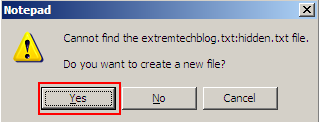
      3.Now type in cmd notepad filename.txt:hiddenand press enter, it will open a pop-up to ask you to create this file just press Yesthen you will see a Notepad file where you can type anything and save it.
      Steganography

      It will make a file with name filename.txtin the drive you are using in Command Prompt. Now try to open that file from your drive, you will see that there will not be any text but we typed in when we created it first time. Now the question is how to see our hidden text, it is very easy and simple just do the same steps we did yes I am right first you have to open Command Prompt then type your drive then go to the location where the file is saved then type in notepad filename.txt:hiddento open the hidden text, if you want to save it then type something new and save this file from file menu and remember you can type any name instead of filename.txtI just used it for this tutorial. Click on the screen shot below to see clearly.
      Steganography

      Monday, October 1, 2012

      How to Recover Windows 7 password in ubuntu?


      (1)First boot from Ubuntu O.S from live cd.

      (2)Open Ubuntu Software Center . Search for CHNTPW . Install package. If you donot have internet  connection on password lost pc then download from  here.

      (3)now open terminal. & type following command    
       cd /media/"drive name of windows 7 partion"/Windows /System32/config
      please use your drive name of partion in which windows 7 is installed without quote.

      (4)now type  sudo chntpw SAM . AND press ENTER. NOW press 1. & restart pc.


      HOW TO run .Exe files with wine ?

      If you run a .exe file with wine and see The file '/home/[username]/example.exe' is not marked as executable. If this was downloaded or copied form an untrusted source, it may be dangerous to run.For more details, read about the executable bit.or anything like that then: This tutorial is for you!

      EDIT: (Actually, this will work on any linux computer but in fluxbox when you right-click on the .exe file and go to the permissions tab there is no mark as executable checkbox [for me] So we have no other choice but to do it via terminal)

      The only thing we have to do is mark it as executable. [which will be explained below]

      I will take the example of example.exe

      It is located in /home/[username]/Downloads

      First, I will go to home/[username]/Downloads or whatever the folder is

      If you did this (go to the folder) with a file manager then (after you are in the folder where the .exe file is present) right click on an empty space on the folder---> then click open in terminal.

      A terminal should pop up.

      in the terminal type ls

      just to see if your file is there. If it isn't then you are not in the correct folder. NOTE: The file should NOT have any spaces. If it does then go back to the folder where it is and right-click it and click Rename then delete the spaces then continue:

      Type

      chmod 544 example.exe

      (Replace example.exe with your .exe file)


      Now go to the .exe file with your file manager. You should see a lock on it. This means that it is executable.

      Click on it. It will open! If it doesn't then either the file can't be opened by wine or you need to upgrade your wine version

      And that's the end of the tutorial!

      How To Recover Windows 7 password?


      Here is the Tutorial how recover forgotten password of xp,vista, win 7?

      (1)First you have to boot from another O.S like ubuntu, back track or any other which come in live cd format.Run O.S from cd.( you can also run O.S from pendrive ,it`s faster than cd)

      (2)Copy "sam" & "system" file from this location C:/WINDOWS/SYSTEM 32/CONFIG (this files contain your password in NTML hash form) and save it in your pendrive.


      (3)Now  We Want to get hashes from this file , there are different types of software available based on O.S. For windows i recommended  you "sam inside" .It`s easy to use. Download from here.

      (4)Now you need other computer to run this file ,because it`s windows compatible program, so copy this "sam" & "system" file &this program in pendrive.

      (5)Now open pendrive in your friend`s computer who has windows . Unzip sam inside & run the program.

      (6)Now Import sam & system file in this software. it will show you username & passwords in hashes  form.

      (7)now next step is to crack hashes. for this purpose you can use tools or online hash cracker.HERE is the   LIST OF ONLINE HASH CRACKER.(please view NTML HASH CRACKER).If you cannot crack online you should use tools like john the ripper , cain & able etc.

      BUT IF YOU CANNOT DO THAT , THEN EASY WAY IS DOWNLOAD Ophacrack iso file form here. Burn into a cd and reboot pc. IT will do automatically for you.

      still you cannot do this send me sam & system file , i will give you password. :)